Extracting Tax Documents & Data
Documentation of the integration point for Formuesforvaltning when interacting with the Knowledgebase service for extracting and uploading tax data (documents) for priviate individuals and companies.
Integration method and flow
The currect service integration method is by redirecting the user to a spesific url containing a set of parameters used to control the behaviour of the service.
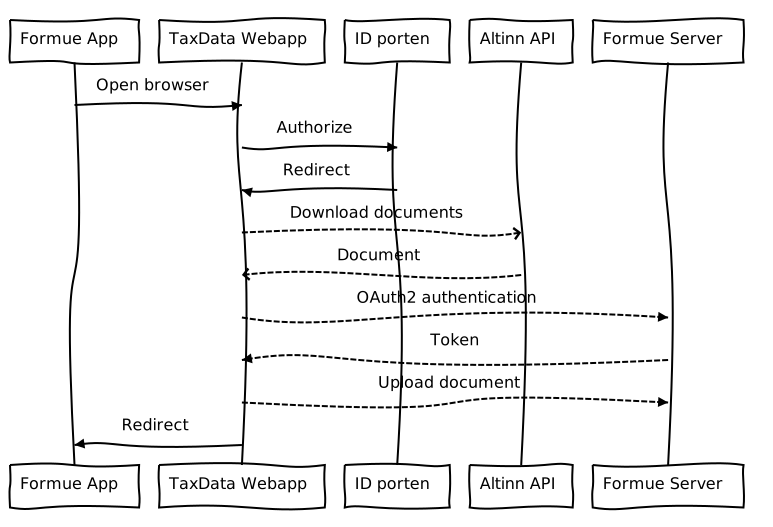
Integration point ("TaxData Webapp")
URLs
Test/QA:
https://formue-qa.knowledgebase.no/get-data
Prod:
https://formue.knowledgebase.no/get-data
Parameters
externalId: ID defined by Formuesforvaltning (e.g. household ID), to be used for identifying the current user/sessionprivateData: Boolean (true|false), defaulttrue. Iffalsethe personal tax data will not be retrieved (e.g. if an accountant needs to retreieve company documents)orgNr: List of organization numbers to retrieve data from, e.g.982463718(single) or982463718,981929055(multiple)callbackUrl: The destination for the documents and data at Formuesforvaltning end (format description here)redirectUrl: The url for which the user (client/browser) is redirected to once the process is complete
Example
https://formue.knowledgebase.no/get-data
?externalId=dcd1b2dd-6605-4e6f-b294-ac21ede474ae
&privateData=true
&orgNr=982463718,981929055
&callbackUrl=https://upload.formue.no
&redirectUrl=https://app.formue.no
Integration point ("Formue Server")
Knowledgebase will authenticate against the provided Oauth2 authentication server from Formuesforvaltning and retrive a valid access token.
Then Knowledgebase will transfer all documents retrived to the destination provided in the callbackUrl parameter, togehter with a metadata structure providing status for the combination of all entities (person or company) and each of the requested documents.
Metadata format
The metadata structure submitted to Formuesforvaltning will contain a list of the requested entities (person or company) and documents. The structure contains the follwoing fields:
entityId: ID of the entity - National identification number ("fødselsnummer") for a person, and the legal organisation number ("organisasjonsnummer") for companiesentityType: Either "PERSON" or "COMPANY"documents: A list of the requested documents includingdocumentName: the form name, e.g. "RF-1028"fileName: The document file namestatus: The status code. For a complete list see here
and can be illustrated as
 "meta": [
    {
       "entityId": "",
       "entityType": "",
       "documents": [
          {
             "documentName": "",
             "fileName": "",
             "status": ""
          },
          ...
       ]
    },
    ...
 ]
Upload format
Knowledgebase will initiate an upload request using the standard encoding type multipart/form-data.
The submitted fields are:
externalId: The same as the input parameter, meaning the ID defined by Formuesforvaltningmeta: The metadata as defined above, as a JSON stringdocuments: A list of the uploaded documents
An illustration of the format of this structure:
{
   "externalId": "",
   "meta": "[{'entityId':'','entityType':'', ...",
   "documents":
      [{
          "fieldname": "documents",
          "originalname": "",
          "encoding": "7bit",
          "mimetype": "application/pdf",
          "buffer": <Buffer  ... >,
          "size": 0
       },
       ...
      ]
}
Example
POST /callback HTTP/1.1
Content-Type: multipart/form-data; boundary=--------------------------168082249463948635472335
Host: localhost
Accept: application/json
Authorization: Bearer TOKEN
Content-Length: 22363
Connection: close
----------------------------168082249463948635472335
Content-Disposition: form-data; name="externalId"
1234
----------------------------168082249463948635472335
Content-Disposition: form-data; name="meta"
[{"entityId":12345678910,"entityType":"PERSON","documents":[{"document":"RF-1030","fileName":"2021 12345678910 RF-1030.pdf","status":"OK"}]},{"entityId":"123456789","entityType":"COMPANY","documents":[{"document":"RF-1028","fileName":"2021 123456789 RF-1028.pdf","status":"OK"},{"document":"RF-1167","fileName":"2021 123456789 RF-1167.pdf","status":"FAILED_NOT_FOUND"}]},{"entityId":"987654321","entityType":"COMPANY","documents":[{"document":"RF-1028","fileName":"2021 987654321 RF-1028.pdf","status":"FAILED_ACCESS"},{"document":"RF-1167","fileName":"2021 987654321 RF-1167.pdf","status":"FAILED_ACCESS"}]}]
----------------------------168082249463948635472335
Content-Disposition: form-data; name="documents"; filename="2021 12345678910 RF-1030.pdf"
Content-Type: application/pdf
[…file content…]
----------------------------168082249463948635472335
Content-Disposition: form-data; name="documents"; filename="2021 123456789 RF-1028.pdf"
Content-Type: application/pdf
[…file content…]
----------------------------168082249463948635472335--
Which can be interpreted as
{
   "externalId":"1234",
   "meta":"[{'entityId':12345678910,'entityType':'PERSON','documents':[{'documentName':'RF-1030','fileName':'2021 12345678910 RF-1030.pdf','status':'OK'}]},{'entityId':'123456789','entityType':'COMPANY','documents':[{'documentName':'RF-1028','fileName':'2021 123456789 RF-1028.pdf','status':'OK'},{'documentName':'RF-1167','fileName':'2021 123456789 RF-1167.pdf','status':'FAILED_NOT_FOUND'}]},{'entityId':'987654321','entityType':'COMPANY','documents':[{'documentName':'RF-1028','fileName':'2021 987654321 RF-1028.pdf','status':'FAILED_ACCESS'},{'documentName':'RF-1167','fileName':'2021 987654321 RF-1167.pdf','status':'FAILED_ACCESS'}]}]",
   "documents":[
      {
         "fieldname":"documents",
         "originalname":"2021 12345678910 RF-1030.pdf",
         "encoding":"7bit",
         "mimetype":"application/pdf",
         "buffer":"",
         "size":10575
      },
      {
         "fieldname":"documents",
         "originalname":"2021 123456789 RF-1028.pdf",
         "encoding":"7bit",
         "mimetype":"application/pdf",
         "buffer":"",
         "size":10575
      }
   ]
}
Status codes
OK: Good to go!FAILED_ACCESS: Access denied for the requested document (most likely no access to the entity as a whole)FAILED_NOT_FOUND: Could not find the requested document (and not due to lack of access)FAILED_CORRUPT_FILE: Document file contents could not be readFAILED_TIMEOUT: Timed out while fetching the document